Skip to content
otlethome

A bookmark manager on your new tab

Stop losing what you save.

Otlet turns every new tab into one search box for all your bookmarks. Type three letters and it's there. Tags instead of folders, and one keystroke to save the page you're on.

Add to ChromeIt's free

No account needed. Also works in Helium, Brave, Edge and other Chromium browsers.

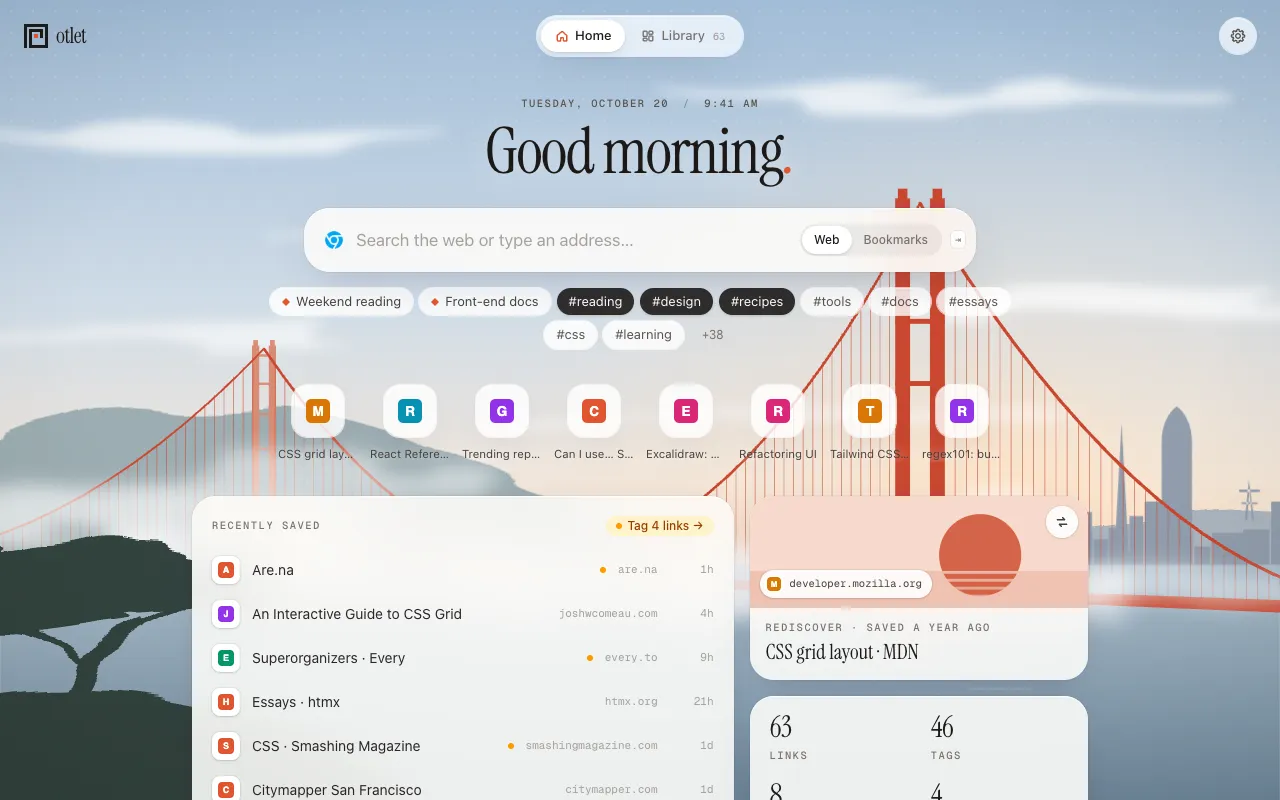
Otlet's new tab: a greeting, one search box for the web and your bookmarks, pinned tags and saved searches, your most used sites, recently saved links and an old link to rediscover, over a painting of the Golden Gate Bridge.

You know you saved it. Somewhere.

A recipe, an article, the docs page you needed last month. So you search Google for it again, or you keep the tab open “for later” until the browser restarts and it's gone too.

Otlet fixes this by letting you search instead of remembering where.

Find

Type three letters. There it is.

Open a new tab and start typing. One box searches titles, addresses, your notes and tags at once, and Enter opens the first result.

  • Narrow down with #tag, leave things out with -#tag, or use site:github.com
  • Save a search you repeat as a smart view, and get back to it in one click
  • From the address bar too: type h, a space and what you're looking for
Searching bookmarks for “css”: matching links come up as you type, with their tags and sites.

Organize

Folders made you choose. Tags don't.

A link can be in #recipes and #party at once, with as many tags as it needs, and Otlet suggests them from your library.

  • The Library shows every link as a card or a list, by tag, smart view or Inbox
  • Sort by newest, oldest, most opened or A to Z
  • Links you haven't tagged yet wait in the Inbox, and a quick one-by-one triage sorts them when you have a minute
The Library: every saved link as a card, with tags, smart views and the Inbox down the side.

Save

Save it, then close the tab.

Press ⌘⇧S (Ctrl+Shift+S on Windows and Linux) on any page, add a tag or two, press Enter. Done.

  • No time to tag? Right-click any page or link to drop it in the Inbox
  • Bookmarks you add the usual way (⌘D or Ctrl+D) land in the Inbox too, so nothing gets lost in a folder
Otlet's quick-save window under its toolbar button, with the page's title, two tags added and more suggested.

Start here

Your bookmarks and the web, one box.

The new tab is your web search too: with your browser's engine, or Google, DuckDuckGo, Brave, Kagi, Startpage, Ecosia, Bing, Perplexity or your own. Typed addresses go straight there.

  • Home shows your pinned tags, saved searches and most used sites, what you saved this week, and one old link to rediscover
  • Search suggestions as you type, if you turn them on
  • A painted Golden Gate that follows your light or dark theme, or the time of day, or no backdrop at all
Web search on the new tab: search suggestions, a page you've visited and a matching bookmark, in one list.

Try it without risking anything

Bring your bookmarks. Leave them where they are.

Free and private

Your bookmarks stay yours.

  • On your computer

    Your library is stored in your browser, on your computer. It isn't copied to a server.

  • No tracking

    No ads, no analytics, no tracking, and Otlet never changes your searches or adds affiliate links. This website has no analytics or trackers either.

  • Crash reports only if you say so

    They're off unless you turn them on. A report says only what broke in Otlet's own code, never your links, searches, notes or tags.

  • No account to make

    Install it and start. There's no sign-up, no email address to give and nothing to log in to.

Otlet is free. There's no paid plan yet.

Read the privacy policy

Why “Otlet”

A search service, decades before the web.

Otlet is named after Paul Otlet, who around 1910 ran a search service on millions of index cards in Brussels. People wrote in with a question, and clerks searched the drawers and sent back the answer. Your bookmarks deserve the same: everything you've saved, one search away.

Everything you've saved, one search away.

Almost here. Otlet is waiting for the Chrome Web Store to publish it. Once it’s there, the Add to Chrome buttons on this page will take you straight to it.

Works in Chrome, Helium, Brave, Edge and other Chromium browsers.